
Order Preview in Prodio – Key Information at Your Fingertips

Quick access to important order details - what is the order preview and how can it make your work easier?
The order preview in Prodio is not only a quick way to check the most important order details but also a tool that helps maintain organization and ensures that all essential information is in the right place🗂️
With this feature, you can verify key data in one place, such as product specifications, deadlines, or attached files, making production management easier and reducing the risk of overlooking important elements📋
However, it's important to remember that from the order preview, you cannot directly edit any data.
This view is solely for reviewing information – any changes must be made in other sections of the system.
The order preview looks like this: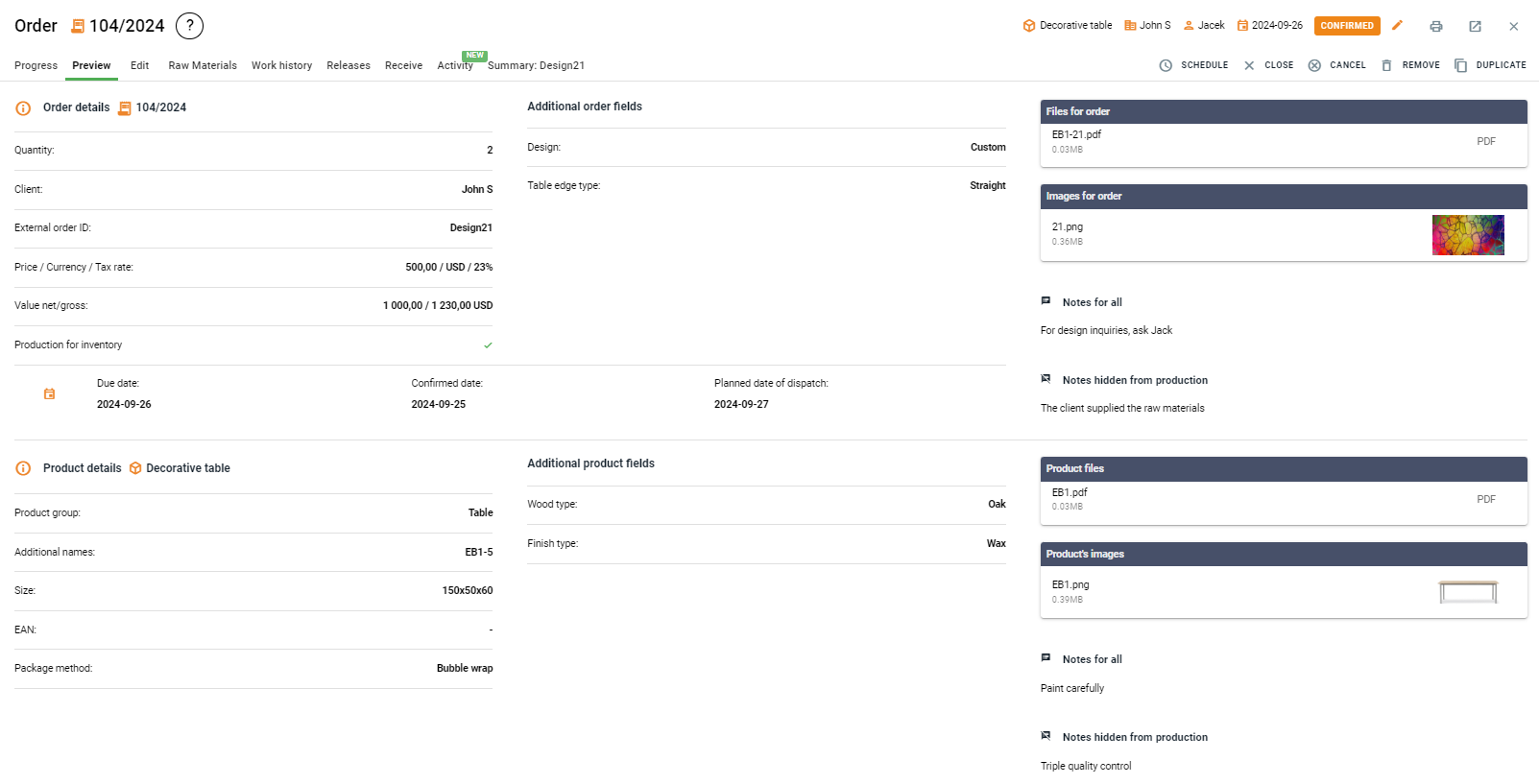
As you can see, the order preview provides access to many details. But what if you want to edit some of them🤔
As mentioned earlier, no data can be edited directly from the order preview – it must be done in other tabs.
Almost all the information visible in the preview can be changed simply by going to the "Edit" tab in a specific order:
The exception is for photos, files, and product notes. These can be modified by going to the "Products" tab and then updating the selected product.
However, keep in mind that if you change this data in the product, it will be updated across all orders with that product, both ongoing and completed ones ✏️
When is it useful to use the order preview?
Order details control – The preview allows you to ensure that all the key product information, such as specifications, has been entered correctly. This makes it easy to check if any important elements were forgotten before production begins, without needing to delve into more detailed tabs or edit data.🔍
Checking full documentation – Often, adding documentation to an order is a multi-step process involving several employees, such as the sales or technical departments. The preview allows you to quickly review all attached files and photos, ensuring that all the necessary documents have been added and that the documentation is complete before the order goes to production.
Minimizing errors – The "Order Preview" view is a great tool for verifying that all data is consistent, helping to minimize the risk of missing key information. By reviewing the order, you can ensure that details such as deadlines, raw materials, or assigned tasks are fully aligned with expectations, helping to avoid production delays and errors.🕒
Quick verification by managers and production workers – For those responsible for production, this view allows a quick confirmation that all information is correct and complete before work begins in full force. The ability to check if all files, photos, and other key data have been added, without needing to interfere with the order, is especially helpful in a fast-paced production environment.
The order preview in Prodio is a fast and easy way to check key information without the need for editing.
Thanks to it, you can ensure that all data is complete and ready for order fulfillment. 🙂
High five 🙋♀️ - team Prodio!
Prodio is a user friendly production planning software for small manufacturers.