
Monthly summary

Monthly Summary - How it works and why it's worth using.
If tracking monthly work hours is consuming too much of your time, or if you're curious which workers are the most productive, then the Monthly Summary is what you need 🔍. This tab will give you access to all this information and more.
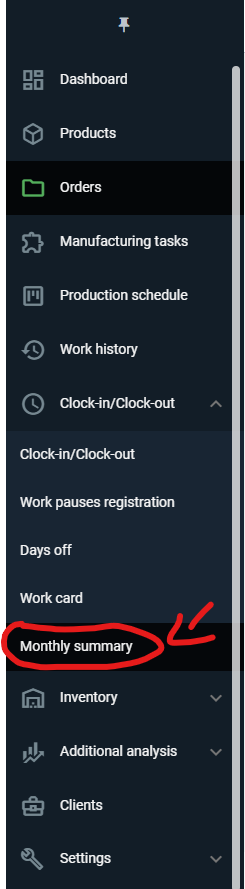
To open the Monthly Summary, select "Clock-In/Clock-out" on the left side panel and then click on "Monthly Summary."
In the table that appears, we can check the number of workdays, absences, total work time (rounded and unrounded), basis (rounded), and overtime (rounded) for each worker in the selected month 🗓️.

If we check "Show time on manufacturing tasks" above the table on the right side, additional columns will appear showing the time spent by the worker on tasks in the selected month and their productivity.
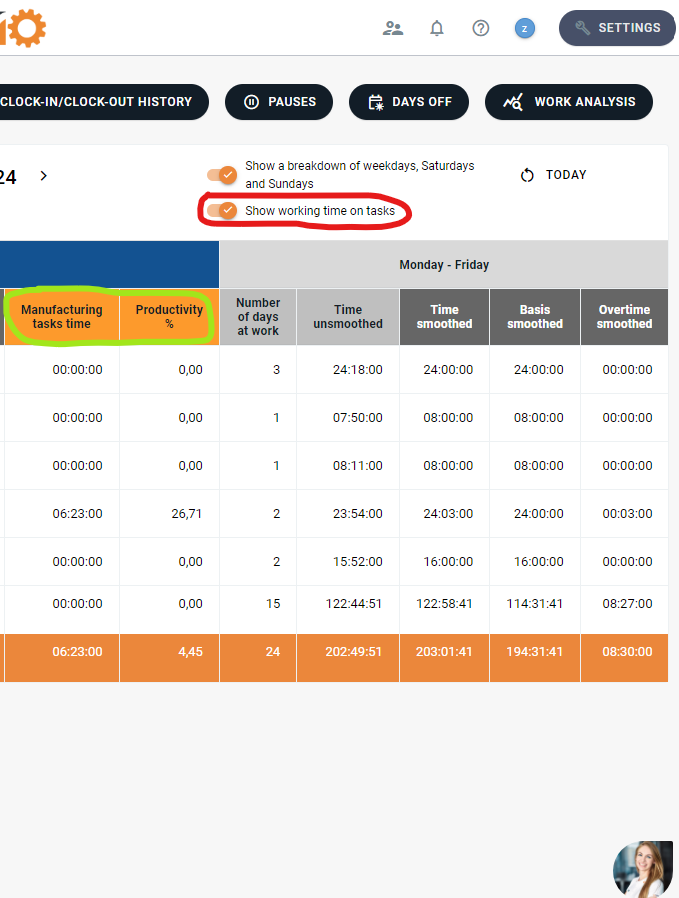
Additionally, if we check the option "Show a breakdown of weekdays, saturdays and sundays”, we can see all the information (except time on tasks and productivity) divided in this way.

All data for the monthly summary is drawn from the "Days off," "Work pauses registration" and "Clock-in/Clock-out" tabs.
Summary:
The monthly Summary tab is an easy and quick way to obtain information about an worker’s work time over the entire month, saving you time and allowing you to see which of your workers is the most productive 📈. However, if you want to take a closer look at information about a specific worker, it's worth using the Work Card, where we can check the distribution of their work time on specific days 😉
High five 🙋♀️ - team Prodio!
Prodio is a user friendly production planning software for small manufacturers.