
Module: Defective Products

Quickly monitor production defects with ease.
The "Defective Products" module helps you monitor errors, defects, and non-conforming products during production. This enables you to respond quickly to issues and maintain control over your production quality. This module is based on defect reports originating from the production plan.
What Information Does the Module Contain and How Does It Work?
The module displays all defect reports on white tiles, with each tile containing the following details: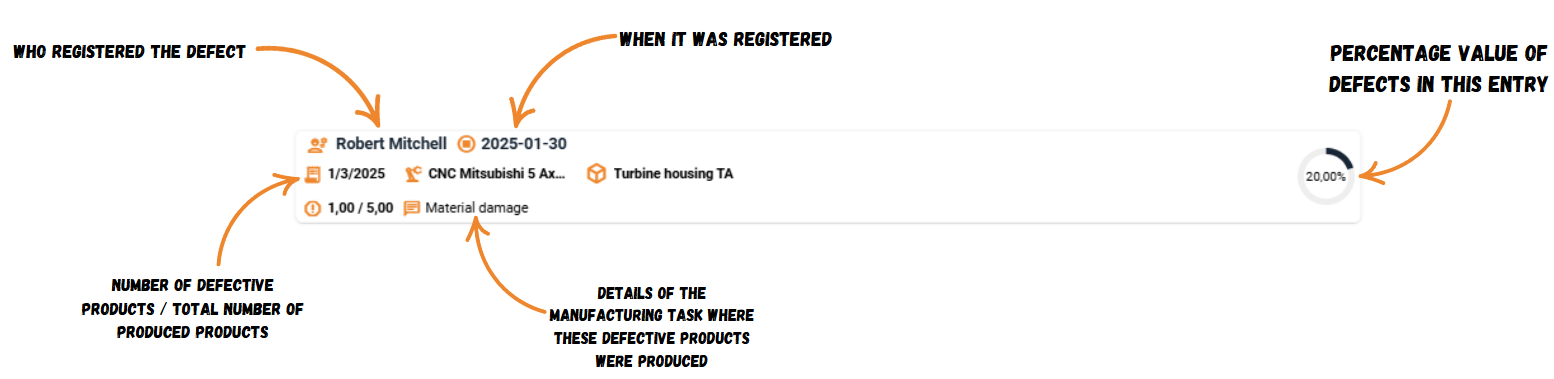
Who registered the defect: At the top, you can see the person who reported the issue.
Report time: The time of the report is displayed, and hovering over it reveals the exact date and time of the operation where the defect occurred.
Prodio ID number: Hovering over this number shows detailed information, such as:
Solution of deficiencies.
Product details related to the defect.
Operation or machine where the defect occurred.
Detailed defect description.
Operation or machine: Name of the operation or machine associated with the defect.
Number of defective products: Indicates how many products were defective in that entry. For example, if a worker registered 37 items, of which 2 were defective, the value will appear as 2/37.
Defect description: Provides information about the cause of the defect.
Visual representation of defect rate in percentage.
Clicking on a tile opens a detailed entry in the work history. You can edit the entry or add more information if necessary.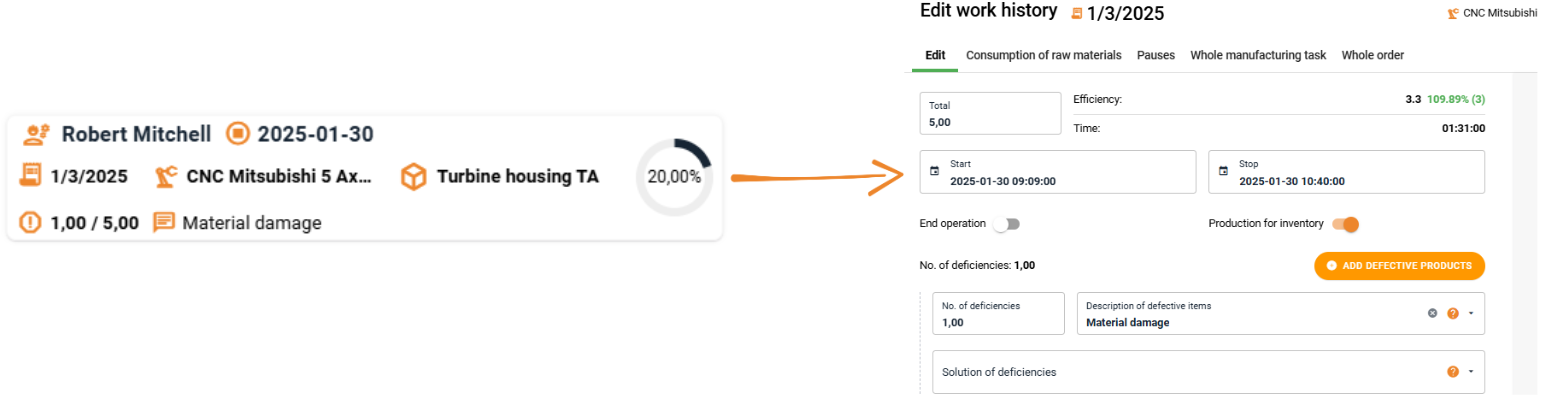
Data Filtering
The module makes it easy to filter data to quickly find relevant information. To filter, click the "Filter" button in the top-right corner and choose your criteria:
By worker: See defects reported by a specific worker.
By product: View defect entries related to a specific product.
By machine or operation: Display defects that occurred on a specific machine or during a particular operation.
With notes or attachments only: Show only entries with additional information, such as descriptions or photos.
Filtering Examples
Check if a specific worker has reported defects recently: Select their name to view entries tied to them.
Analyze issues related to a specific product: Use the "Product" filter to identify product-specific defects.
Investigate a potentially problematic machine: Select the machine’s name to see all defects recorded on it.
Sorting Data
You can sort data in the module, such as by date (ascending or descending) to view the newest or oldest reports. Sorting can also organize data by worker, product, or operation for easier navigation.
High five 🙋♀️ - team Prodio!
Prodio is a user friendly production planning software for small manufacturers