
Importing data into Prodio - how to do It?

In this guide, you'll learn how to import data into Prodio.
To import data into Prodio, we need a data file in CSV, XLSX, or XLS format.
How to Create a CSV or Excel File for Importing Data into Prodio?
Choose a spreadsheet program like Google Sheets, Excel, or LibreOffice. Then, download the sheet in CSV, XLSX, or XLS format. If using Google Sheets: select File → Download → Microsoft Excel (.xlsx) or Comma-separated values (CSV).
What data can be imported?
Raw materials, suppliers, clients, products, product technology, raw materials for products, orders.
Creating Templates:
You can create and save import templates in Prodio before starting the import process. This makes the data import faster and more efficient.
Detailed instructions on creating and saving templates can be found here: [LINK to instructions].
During data import, you can create a new template by choosing the 'add during import' option in the import configuration section. This newly created template will be saved in the system as one of the existing ones, which you can use in the future.
How to Import a File into Prodio?
Open the importer in Prodio, available in Settings or by using the data import button.
Choose the type of import and configuration. If you don't have templates created earlier, select the 'add during import' option. Choose the file for import.
Connect the data from the file with fields in Prodio. Assign fields from the sheet to the corresponding fields in the Prodio system. (If using a ready-made template where fields are already matched, this step will be skipped).
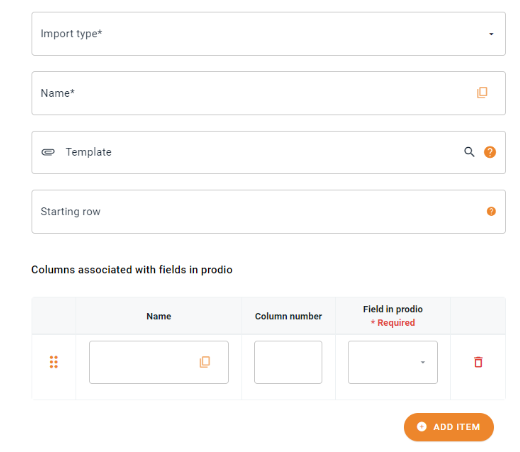
If your spreadsheet contains data that needs to be connected with data from other tables in the database, a window for connecting these data will appear. This situation might occur, for example, when importing product technology, where it is mandatory to link the technology to a specific product and to a specific machine/operation.
After clicking Save, you may make any necessary corrections to the data before its final import.
Save changes to load the data into the system.


Importing data allows for quick addition of multiple pieces of information to the Prodio system, eliminating the need for manual entry of each item separately.
If needed, refer to the instructions on creating import configurations and import history available in the Prodio system.
High five 🙋♀️ - The Prodio Team!
Prodio Manufacturing Management Software - The most convenient way to plan production and control work online.