
How to configure the RFID reader and tags?

You will learn how to configure the RFID reader and how to assign a tag or card to worker!
WHAT IS IT?
RFID/NFC readers and tags/cards will allow you to register work on tasks more quickly. This is the most convenient and the most chosen option for work registration among our clients.
HOW TO SET IT UP?
You will need an RFID reader and tags. Connect the reader to your computer—it should be ready to use immediately after connecting. Next, click on Settings on the left side, and then Workers.
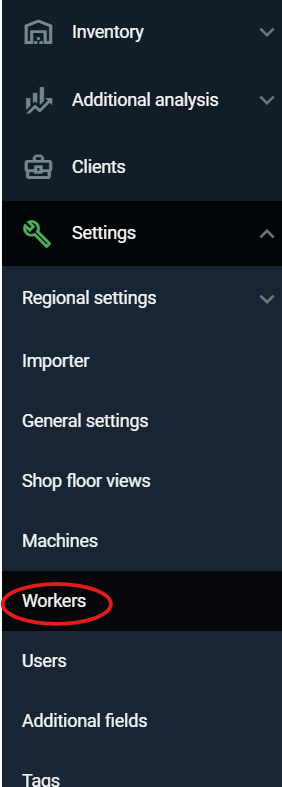
After clicking on 'Workers,' you will see a table with the employees already in the system. If you want to assign a tag to an existing employee, click on the edit icon (a pencil).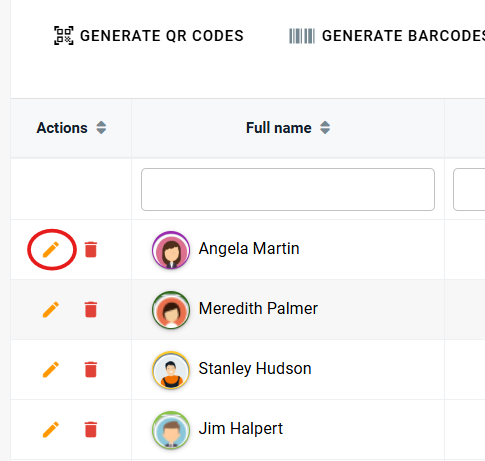
After clicking 'Edit,' worker's edit card will appear on the right side of the screen. Remove the digits in the 'QR/RFID' field, leave the cursor in the field, and then place the tag on the RFID reader previously connected to the computer - the field will fill with digits. Click the 'Save' button.
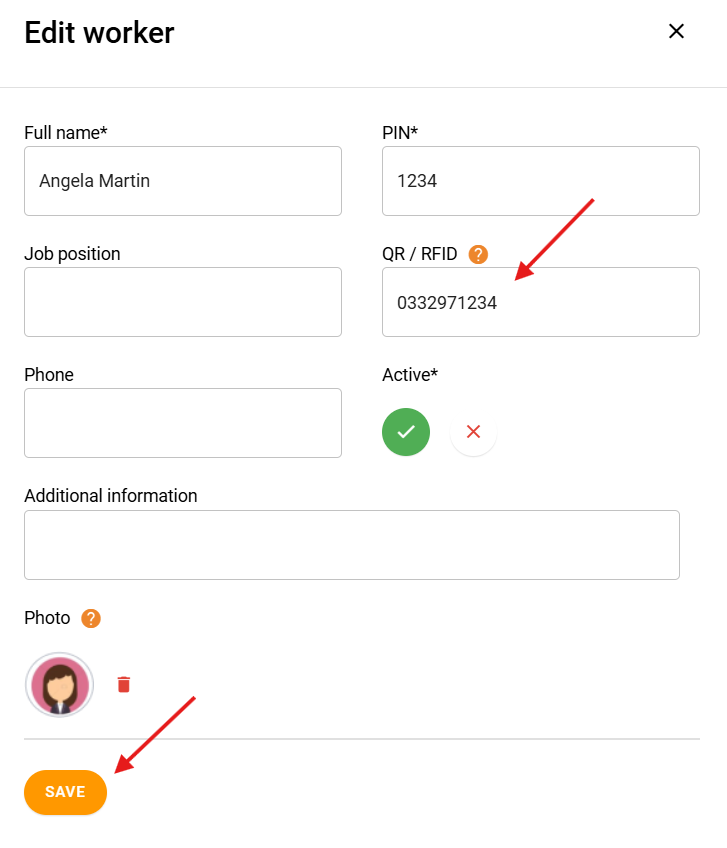
Now worker has an assigned tag and can quickly register work on tasks, as well as clock in and out of work.
THE MOST COMMON QUESTIONS
What to do if worker loses his tag?
You will need to assign a new tag to the employee. In the meantime, if you don't have a spare one, they can register their work using a PIN.
How much does the RFID reader costs, and what specifications should it have?
The price ranges between 10-20 USD. We recommend readers with a USB connection and a frequency of 125 kHz - though higher frequencies are also supported by Prodio.
High five 🙋♀️ - team Prodio!
Prodio is a user friendly production planning software for small manufacturers